#Tech
43 posts tagged “Tech”
43 posts tagged “Tech”

I’ve got a small repo, ContextFree, that I keep coming back to whenever I want the specific kind of fun that comes from writing a handful of lines of code and having something unexpectedly pretty fall out the other end. It’s a collection of Context Free Art scripts — a tiny grammar for describing images as recursive drawing rules — plus a Docker image wrapping the cfdg renderer so I can run them without installing anything locally.
Back when I wired GoatCounter into this blog, the honest answer to “does any of this actually get read” was a shrug — no analytics meant no way to know. It’s been running for a couple of weeks now, so pulled the first export and had a proper look.
Rather than paste a wall of numbers, here’s the breakdown as an actual chart — daily pageviews, top pages, referrers, and where the hits are coming from:

Been using Claude Code as my daily driver for a few days now, so when Google’s Antigravity CLI showed up I figured it was worth a proper look rather than just reading the launch blog post. Ran it side by side with Claude Code on the same kind of day-to-day work — repo exploration, small fixes, the usual — to see how the two actually compare in practice rather than on paper.

This blog is just Hugo content and a vendored theme — no app code, nothing exciting — which is exactly the kind of repo that quietly accumulates small rot nobody notices because nothing ever actually breaks the build. Spent a session pointing Claude Code at it to find and fix that rot.
Started with a straight status check: a couple of generated CSS cache files showing as deleted (build artifacts that shouldn’t have been tracked in the first place) and a stray uncommitted edit sitting inside the ananke theme submodule from as far back as November 2024. Both restored/reverted to get back to a clean tree before touching anything else.

Spent today “vibe coding” with Claude, just describing what I wanted and letting it drive, to see how far that gets you on a small self-contained project. The result is fractalPy, a small Numba-accelerated Mandelbrot set renderer.

It started as a single script — render the set to a PNG, colour it, done — using @njit(parallel=True, fastmath=True, cache=True) to JIT-compile the escape-time kernel so it’s fast enough to iterate on interactively:

I’ve been using Google alerts to get emails of news about various topics for a while. As I’m reducing my Google footprint this was one of the things I had trouble replacing, until now.
Using Brave Search API node in N8N I can now search for news on a topic and format it into a email digest.


Saved Workflow in Jason format.
Found N8N recently which is an open-source workflow automation tool that lets you connect various services and automate tasks.
Think IFTTT which you can host yourself locally.
I run it locally on my Debian Linux Server using this Docker compose file.
services:
  n8n:
    image: n8nio/n8n:latest
    container_name: n8n
    environment:
      - GENERIC_TIMEZONE=Europe/Amsterdam
      - NODE_ENV=production
      - N8N_SECURE_COOKIE=false
    ports:
      - "5678:5678"
    volumes:
      - n8n_data:/home/node/.n8n
    restart: unless-stopped

volumes:
  n8n_data:
    name: n8n_data
    external: true
You can use it do automate all sort of tasks, I am currently testing it posting RSS feed updated to a Discord Server.
Having been a bit lazy in not updating my Hugo version since I started which was recently breaking one of my Github actions, I decided do do that.
This lead to an cascading update cycle.
Still a couple of deprecated warning and fixing background and social icon links to sort out but at least now running against the latest version of Hugo.

I’ve started playing about with Node JS to learn it enough to modify some legacy Lambda code.
One of the tasks I set myself was to write a Joke bot for Mastodon, which work out to be fairly easy with a couple of packages got and masto.
Dad Joke Bot the code is only 32 lines long, looking to expand it to be able to post images as well.
Do you ever use print() or log() to debug your code? Of course you do. IceCream, or ic for short, makes print debugging a little sweeter.
ic() is like print(), but better.

I got a cheap SPI TFT ST7735 Display module with SD Card reader off ebay, it had an unusual number of pins on the back.

It took a while searching about on the internet and some head scratching to find a library and work out what connected to what on the Pico.
This is what I found, and worked out.
| TFT Board | Raspberry Pi Pin |
|---|---|
| LED | 3v3(Out) |
| SCK | GP10 |
| SDA | GP11 |
| AO/DC | GP16 |
| Reset | GP17 |
| CS | GP18 |
| GND | GND |
| VCC | VBUS 5V |
Using that information I was able to put together this library based on a few others I found and a few test programs.
Something I did a few (8) years ago on the Arduino to display two-digit numbers on a 8x8 LED matrix, this is an update to do the same in Micropthon.
Numbers have been defined to 3x5 pixels, so for a two-digit number it fits into 8x5 LED grid with spacing, saving some LED Matrix space.

The code for this can be found here numbers.py
Just a short bit of code to test a DHT11 temperature and humidity sensor module.
This version has just three pins VCC, GND and data, so easy to connect and use with the DHT library.


Found a LED Matrix with a Max7219 in my parts bin (box of random electronics in the garage) so looked into getting it working with the Pico and MicroPython.
This is an example why I love open source. The original library I found was functional but sparse, last committed to 4 years ago. There were a few forks, most not much activity. One had been active recently and had some major improvements in functionality so switched over to that fork. https://github.com/enchant97/micropython-max7219
Stumbled across a Python script to run a Mandelbrot set in ASCII in Python so I thought I would see how it ran on the RaspberryPi Pico.
After tweaking it slightly from the source it ended up like this mandelbrot.py
This results in the following;
                             ...................................................................................................
                           .....................................................................................................
                         .......................................................................................................
                       .........................................................................................................
                     ...................................,,,,,,,,,,,,,,,,,.......................................................
                    ..........................,,,,,,,,,,,,,,,,,,,,,,,,,,,,,,,,,,,,,.............................................
                  .....................,,,,,,,,,,,,,,,,,,,,,,,,,,,,,,,,,,,,,,,,,,,,,,,,,,,......................................
                 .................,,,,,,,,,,,,,,,,,,,,,,,,,,,,,,,,,,,,,,,----------,,,,,,,,,,,,.................................
               ...............,,,,,,,,,,,,,,,,,,,,,,,,,,,,,,,,,,,,---------:i;;::::-------,,,,,,,,,.............................
              .............,,,,,,,,,,,,,,,,,,,,,,,,,,,,,,,,,,,----------:::;ih$+;;::::-------,,,,,,,,,..........................
             ...........,,,,,,,,,,,,,,,,,,,,,,,,,,,,,,,,,,,------------::::;;+# hiiii :---------,,,,,,,,,.......................
            .........,,,,,,,,,,,,,,,,,,,,,,,,,,,,,,,,,,,-------------:::::;;i+hM MM #+;;:---------,,,,,,,,,,....................
          .........,,,,,,,,,,,,,,,,,,,,,,,,,,,,,,,,,,--------------::::::;;ii+hH* $H+ii;:::---------,,,,,,,,,,..................
         ........,,,,,,,,,,,,,,,,,,,,,,,,,,,,,,,,,,---------------::::::;i+HhH     *h++;;::::---------,,,,,,,,,,................
        .......,,,,,,,,,,,,,,,,,,,,,,,,,,,,,,,,,---------------::::::;;;+           *@ +i;::::::-------,,,,,,,,,,,..............
        .....,,,,,,,,,,,,,,,,,,,,,,,,,,,,,,,,,---------------::::;;;;;ii+hM@          $hii;;:::::::------,,,,,,,,,,,............
       .....,,,,,,,,,,,,,,,,,,,,,,,,,,,,,,,,--------------:::;;;;;;iiii++h            *h+ii;;;;:::::::----,,,,,,,,,,,...........
      ....,,,,,,,,,,,,,,,,,,,,,,,,,,,,,,,-------------::::;ii++ ++++++hhHH$@         @MHhh++ii;;;;;ihi;:---,,,,,,,,,,,,.........
     ....,,,,,,,,,,,,,,,,,,,,,,,,,,,,,,----------:::::::;;+H   @MHhH$  #                 $@  h++ii++M$i;:---,,,,,,,,,,,,........
     ...,,,,,,,,,,,,,,,,,,,,,,,,,,,,--------::::::::::;;;ii@      #@                         $HH*  $#  #;:---,,,,,,,,,,,,.......
    ..,,,,,,,,,,,,,,,,,,,,,,,,,,,------:::::::::::::;;;;ii+hM                                        * i;::---,,,,,,,,,,,,,.....
   ..,,,,,,,,,,,,,,,,,,,,,,,,,-----:::::::::::::::;;;;;i++HHM#                                       *+;;:::---,,,,,,,,,,,,,....
   ..,,,,,,,,,,,,,,,,,,,,,-----::::::::::::::::;;;;;;iiM                                           #Mhii;;::---,,,,,,,,,,,,,....
  ..,,,,,,,,,,,,,,,,,------::;iH+;;;;;;;;;;;;;;;iiiii++H$                                            Mh++;::----,,,,,,,,,,,,,...
  .,,,,,,,,,,,,---------::::;;iH#++iiii++H*++iiiiii+++H$                                               $ H;::----,,,,,,,,,,,,,..
  ,,,,,,,,------------:::::;;;+h **M HhhM  $HHMhhhhhhHM@                                                 H;::----,,,,,,,,,,,,,,.
 .,,,,,------------::::::::;;ii+hM#    @@      #$HHHHM                                                 H+i;::-----,,,,,,,,,,,,,.
 ,,,,------------:::::::::;iiiihh$                 $$*                                                 @ i;::-----,,,,,,,,,,,,,,
 ,,-------------::::::::;;iii+H *                   @                                                  M+;:::-----,,,,,,,,,,,,,,
 ,------------:::::;;;;i+#HhhhM$@                                                                      Mi;:::------,,,,,,,,,,,,,
 ----------::;;;;;;;iii+hH* *  @                                                                      hi;::::------,,,,,,,,,,,,,
 ::::;;;iiMiiiiii+++++MHM                                                                           $+i;;::::------,,,,,,,,,,,,,
                                                                                                  *Hh+i;;::::------,,,,,,,,,,,,,
 ::::;;;iiMiiiiii+++++MHM                                                                           $+i;;::::------,,,,,,,,,,,,,
 ----------::;;;;;;;iii+hH* *  @                                                                      hi;::::------,,,,,,,,,,,,,
 ,------------:::::;;;;i+#HhhhM$@                                                                      Mi;:::------,,,,,,,,,,,,,
 ,,-------------::::::::;;iii+H *                   @                                                  M+;:::-----,,,,,,,,,,,,,,
 ,,,,------------:::::::::;iiiihh$                 $$*                                                 @ i;::-----,,,,,,,,,,,,,,
 .,,,,,------------::::::::;;ii+hM#    @@      #$HHHHM                                                 H+i;::-----,,,,,,,,,,,,,.
  ,,,,,,,,------------:::::;;;+h **M HhhM  $HHMhhhhhhHM@                                                 H;::----,,,,,,,,,,,,,,.
  .,,,,,,,,,,,,---------::::;;iH#++iiii++H*++iiiiii+++H$                                               $ H;::----,,,,,,,,,,,,,..
  ..,,,,,,,,,,,,,,,,,------::;iH+;;;;;;;;;;;;;;;iiiii++H$                                            Mh++;::----,,,,,,,,,,,,,...
   ..,,,,,,,,,,,,,,,,,,,,,-----::::::::::::::::;;;;;;iiM                                           #Mhii;;::---,,,,,,,,,,,,,....
   ..,,,,,,,,,,,,,,,,,,,,,,,,,-----:::::::::::::::;;;;;i++HHM#                                       *+;;:::---,,,,,,,,,,,,,....
    ..,,,,,,,,,,,,,,,,,,,,,,,,,,,------:::::::::::::;;;;ii+hM                                        * i;::---,,,,,,,,,,,,,.....
     ...,,,,,,,,,,,,,,,,,,,,,,,,,,,,--------::::::::::;;;ii@      #@                         $HH*  $#  #;:---,,,,,,,,,,,,.......
     ....,,,,,,,,,,,,,,,,,,,,,,,,,,,,,,----------:::::::;;+H   @MHhH$  #                 $@  h++ii++M$i;:---,,,,,,,,,,,,........
      ....,,,,,,,,,,,,,,,,,,,,,,,,,,,,,,,-------------::::;ii++ ++++++hhHH$@         @MHhh++ii;;;;;ihi;:---,,,,,,,,,,,,.........
       .....,,,,,,,,,,,,,,,,,,,,,,,,,,,,,,,,--------------:::;;;;;;iiii++h            *h+ii;;;;:::::::----,,,,,,,,,,,...........
        .....,,,,,,,,,,,,,,,,,,,,,,,,,,,,,,,,,---------------::::;;;;;ii+hM@          $hii;;:::::::------,,,,,,,,,,,............
        .......,,,,,,,,,,,,,,,,,,,,,,,,,,,,,,,,,---------------::::::;;;+           *@ +i;::::::-------,,,,,,,,,,,..............
         ........,,,,,,,,,,,,,,,,,,,,,,,,,,,,,,,,,,---------------::::::;i+HhH     *h++;;::::---------,,,,,,,,,,................
          .........,,,,,,,,,,,,,,,,,,,,,,,,,,,,,,,,,,--------------::::::;;ii+hH* $H+ii;:::---------,,,,,,,,,,..................
            .........,,,,,,,,,,,,,,,,,,,,,,,,,,,,,,,,,,,-------------:::::;;i+hM MM #+;;:---------,,,,,,,,,,....................
             ...........,,,,,,,,,,,,,,,,,,,,,,,,,,,,,,,,,,,------------::::;;+# hiiii :---------,,,,,,,,,.......................
              .............,,,,,,,,,,,,,,,,,,,,,,,,,,,,,,,,,,,----------:::;ih$+;;::::-------,,,,,,,,,..........................
               ...............,,,,,,,,,,,,,,,,,,,,,,,,,,,,,,,,,,,,---------:i;;::::-------,,,,,,,,,.............................
                 .................,,,,,,,,,,,,,,,,,,,,,,,,,,,,,,,,,,,,,,,----------,,,,,,,,,,,,.................................
                  .....................,,,,,,,,,,,,,,,,,,,,,,,,,,,,,,,,,,,,,,,,,,,,,,,,,,,......................................
                    ..........................,,,,,,,,,,,,,,,,,,,,,,,,,,,,,,,,,,,,,.............................................
                     ...................................,,,,,,,,,,,,,,,,,.......................................................
                       .........................................................................................................
                         .......................................................................................................
                           .....................................................................................................
I amended the code to update the OLED I was using in the temperature sensor tests mand_oled.
Have been tinkering with temperature measurement using the Raspberry Pi Pico.
First with the internal temperature sensor and then using a TMP36 temperature sensor externally.
I wrote two classes to access these and return the reading.
Here is an example using the two sensors together temps.py
You will need to upload the two classes to the Pico first in a library sub-directory.
Here is how you would wire it up on a breadboard tmp36.fzz
Some components arrived from AliExpress recently so been able to play with an I2C OLED display with my Pico W.
Hello World Test

Code of this is here https://github.com/alastairhm/pico_w/blob/main/i2c_scan.py
And also used here to display the IP address after connected to the wifi https://github.com/alastairhm/pico_w/blob/main/wifi_oled.py
Next thing I’ve been playing with is internal and external temperature sensors, I will post about that soon.
Just before Christmas I got a Raspberry Pi Pico W to have a play with.
Looking forward to using MicroPython to do some LED flashing and other things.
Started a repo on Github for it Pico W Repo

Picked this indie retro style platform game for my Playstation 5 cheap recently.
It was released in 2013, so old now but still a good play.

More fun playing with BBC Twitter Bot.
https://tco/ks0jhudxdM
https://tco/jVpUMLBa8D
https://tco/Rt3DOf1FOh
I wrote a simple Python script to monitor the clipboard and write any unique text content out to a YAML file for a history. It might turn into something better eventually.
Updated to use a settings file for file location and size.
#!/usr/bin/env python3

import pyperclip
import time
import yaml
import toml
import os
from yaml.loader import SafeLoader

script_path = os.path.dirname(os.path.abspath(__file__))
settings = toml.load(os.path.join(script_path, "clippy.toml"))
history = settings["history"]
max_size = settings["size"]

cliptext = ""
clip_array = []
with open(history, "r") as f:
    clip_array = list(yaml.load_all(f, Loader=SafeLoader))
    clip_array = sum(clip_array, [])

while True:
    tmptext = pyperclip.paste()
    if tmptext != cliptext:
        cliptext = tmptext
        if cliptext not in clip_array:
            clip_array.insert(0,tmptext)
            if len(clip_array) > max_size:
                clip_array.pop()
            with open(history, "w") as f:
                f.write(yaml.dump(clip_array))
    time.sleep(1)
Script on GitHub https://github.com/alastairhm/automate_python/blob/main/clippy.py
Got a new Mac with Catalina pre-installed, so had to compile my own version of Beebasm for the 64 bit OS.
BBC Micro machine code take on C64 10 Print one line random pattern generator.
Code at Github 10print.asm

\ 10 PRINT
\ Using BeebASM assembler
\ (c) Alastair Montgomery

INCLUDE "../lib/constants.asm"
seed = &70

ORG &2000

.start
    LDA #23
    STA seed
    LDA #63
    STA seed+1
    LDX #0
.char
    LDA chartable, X
    JSR oswrch
    INX
    CPX #23
    BNE char
.loop
    JSR random
    BMI two
.one
    LDA #224
    JMP print
.two
    LDA #225
.print
    JSR oswrch
    JMP loop
.finish
    RTS
.random
    INCLUDE "../lib/random.asm"
.chartable
    EQUB 22,0
    EQUB 23,224,8,8,12,7,224,48,16,16
    EQUB 23,225,16,16,48,224,7,12,8,8
.end

SAVE "MyCode", start, end
Recently had a need to get the CA Thumbprint from the Root certificate of a domain. This was for creating OIDC provider for an AWS EKS cluster.
This is the solution I came up with.
Been trying to relearn 6502 assembly language for fun, its a lot faster and easier than the first time on actual hardware when I was a teenager.
Been using a book I picked up from eBay Discovering BBC Micro Machine Code by A.P. Stephenson
Using BeebAsm assembler on my Mac with a BBC Micro emulator, rather than build in BBC BASIC one.
You can find my code at Github https://github.com/alastairhm/beebasm
This example draws a line of zeros to Mode 7, see screenshot below.

One thing that I’ve never got around to seriously try in my years messing around with different operating systems is BSD, other than the flavor of it your get with MacOs.
Having watch a lot of videos around it recently on YouTube by RoboNuggie on FreeBSD it encouraged me to have to give it a go.
It went surprisingly well the and have tried both XFCE and Mate desktop installs. Something that I’ll look at using more of in the future as a backup daily driver.


One of my favorite low foot print Linux installs is Puppy Linux been using it on and off for years.
It has saved my bacon on a few times used to boot and restore or save data from a dead OS install.
New version looks good so far.
BBC Micro take on C64 10 Print one line random pattern generator.
10 MODE 0
20 N=RND(1):IF N > 0.5 THEN PRINT "/"; ELSE PRINT "\";
30 GOTO 20
RUN

It is funny how things come around again, when I started learning to programming back in the 1980s on my 8 bit machines (ZX81, Acorn Electron, BBC Micro) I used to play with graphics a lot. It gave instant feedback and visually showed the results of things like recursion. I had great fun playing with Fractals and other procedural generated images.
Recently I discovered a YouTube channel and programming platform which took me right back to those days.

I made the switch from Bash shell to the FISH shell a couple of years ago now and never looked back.
Customization and auto-complete features was the killer features for me.
Jump to the 20 minute mark for the shell discussion if you want.
Video Source Destination Linux
New retro game, looks worth getting a Amstrad CPC emulator setup to play it.
Juan’s games: (https://www.usebox.net/jjm/)
Buy physical copies of these games:
One thing I like about Hugo is how easy it is to expand its functionality with your own code.
For example was able to create a shortcode to embed Lbry.tv videos into a post in around five minutes.
First I created an empty file layouts/shortcodes/lbry.html which I pasted the basic embed code take from the share button on one of their videos.
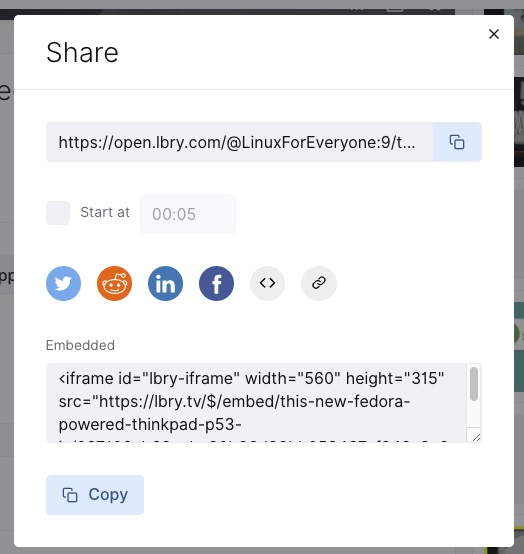
<iframe id="lbry-iframe" width="560" height="315" src="https://lbry.tv/$/embed/this-new-fedora-powered-thinkpad-p53-is/097106eb68aebc90b33d83bb053467af942a8e20" allowfullscreen></iframe>
Then parameterized this so that the src url can be changed.
New retro game, looks worth getting a Commodore emulator setup to play it.
This style of game is one of my favorites, loved Boulder Dash and Repton.

One of the games I loved playing in my youth on my BBC Micro, I’m still rubbish at it to this day.

Found this useful Android Mark down application.
Markor it has a Hugo template to use for blank documents which is useful.
It’s on FDroid so it’s easy to install o on my kindle as well.
Then use Github website to upload the new file to my Hugo blog repo.
Testing github Web upload.
Update
Edited on mark down app, uploaded again via github web page.

Found mGit App which looks like it would do the job of repo management on Android.
First trial not so good.

Wondering if its an issue with having MFA enabled on my Github account, although using my personal access token instead of the password should work I would have thought.
I’ve submitted an issue on their Github page, so wait and see what they say about it.
Trying to think of a way to be able to post content from my Android devices (phone/ Fire Tablet).
Basically would need just the following;
My Travis CI pipeline would then handle the publishing.
Finding a text editor app isn’t a problem there are any number of them on both Google Play and Amazon Kindle stores which could be used.
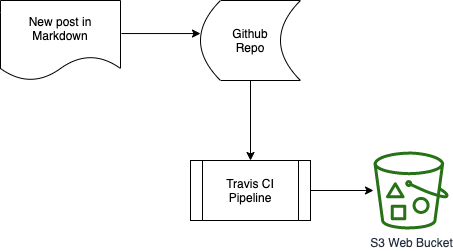
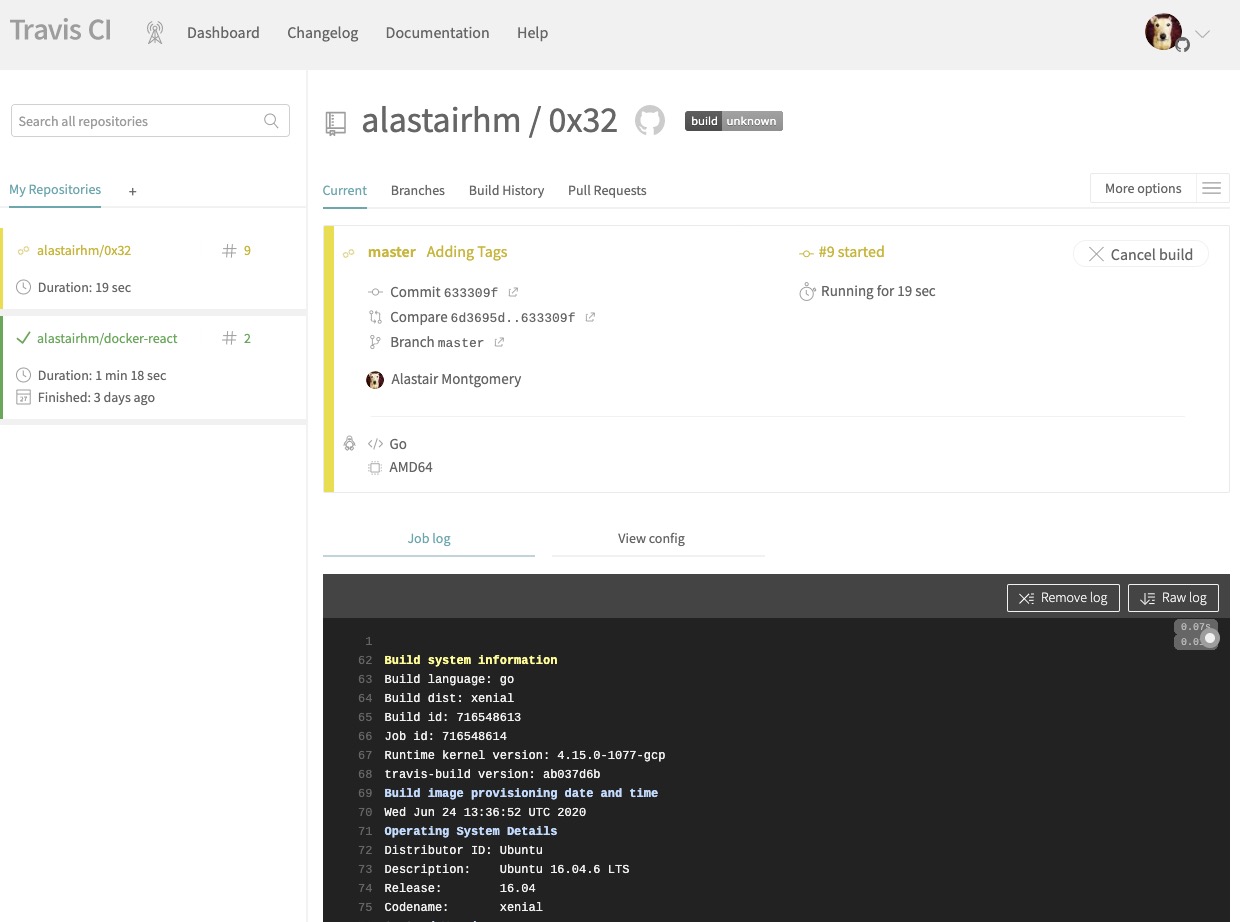
To make the publishing of new content easily I am using Travis CI to publish changes.
I did try installing Hugo from source but this took longer and was producing errors so it was easier to download the binary.
Using this as the Travis CI pipline yaml.
# Auto deploy repo from Github to Amazon S3 bucket via Travis CI
# * Set env vars for ACCESS_KEY_ID, BUCKET_NAME and SECRET_ACCESS_KEY on Travis
# * Update `bucket.name` in `sync` command
# * Assumes your `publishDir` is the default (`public`) - if not update `sync` command

language: go
before_install:
addons:
  apt:
    packages:
    - libcurl4-openssl-dev # required to avoid SSL errors
install:
  - curl -LO https://github.com/gohugoio/hugo/releases/download/v0.74.3/hugo_0.74.3_Linux-64bit.deb
  - sudo dpkg -i hugo_0.74.3_Linux-64bit.deb
before_script:
  - python --version
  - sudo pip install s3cmd
script:
  - hugo
after_success:
  - s3cmd sync -v --delete-removed --no-preserve --access_key=$ACCESS_KEY_ID --secret_key=$SECRET_ACCESS_KEY -r public/ s3://$BUCKET_NAME
notifications:
    email: true