#Code
17 posts tagged “Code”
17 posts tagged “Code”
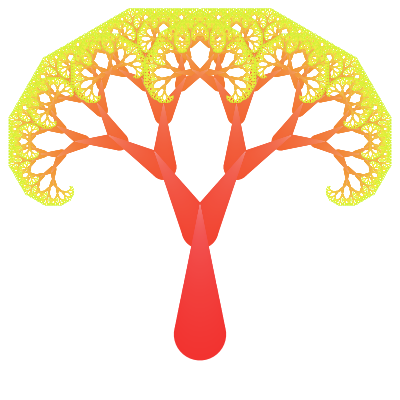
I’ve got a small repo, ContextFree, that I keep coming back to whenever I want the specific kind of fun that comes from writing a handful of lines of code and having something unexpectedly pretty fall out the other end. It’s a collection of Context Free Art scripts — a tiny grammar for describing images as recursive drawing rules — plus a Docker image wrapping the cfdg renderer so I can run them without installing anything locally.

This blog is just Hugo content and a vendored theme — no app code, nothing exciting — which is exactly the kind of repo that quietly accumulates small rot nobody notices because nothing ever actually breaks the build. Spent a session pointing Claude Code at it to find and fix that rot.
Started with a straight status check: a couple of generated CSS cache files showing as deleted (build artifacts that shouldn’t have been tracked in the first place) and a stray uncommitted edit sitting inside the ananke theme submodule from as far back as November 2024. Both restored/reverted to get back to a clean tree before touching anything else.

Spent today “vibe coding” with Claude, just describing what I wanted and letting it drive, to see how far that gets you on a small self-contained project. The result is fractalPy, a small Numba-accelerated Mandelbrot set renderer.

It started as a single script — render the set to a PNG, colour it, done — using @njit(parallel=True, fastmath=True, cache=True) to JIT-compile the escape-time kernel so it’s fast enough to iterate on interactively:

Nearing the time for Advent of Code 2024 thinking of using Node NPM again this year.
Hopefully will complete more this year than before.
I’ve started playing about with Node JS to learn it enough to modify some legacy Lambda code.
One of the tasks I set myself was to write a Joke bot for Mastodon, which work out to be fairly easy with a couple of packages got and masto.
Dad Joke Bot the code is only 32 lines long, looking to expand it to be able to post images as well.
Do you ever use print() or log() to debug your code? Of course you do. IceCream, or ic for short, makes print debugging a little sweeter.
ic() is like print(), but better.

I got a cheap SPI TFT ST7735 Display module with SD Card reader off ebay, it had an unusual number of pins on the back.

It took a while searching about on the internet and some head scratching to find a library and work out what connected to what on the Pico.
This is what I found, and worked out.
| TFT Board | Raspberry Pi Pin |
|---|---|
| LED | 3v3(Out) |
| SCK | GP10 |
| SDA | GP11 |
| AO/DC | GP16 |
| Reset | GP17 |
| CS | GP18 |
| GND | GND |
| VCC | VBUS 5V |
Using that information I was able to put together this library based on a few others I found and a few test programs.
Something I did a few (8) years ago on the Arduino to display two-digit numbers on a 8x8 LED matrix, this is an update to do the same in Micropthon.
Numbers have been defined to 3x5 pixels, so for a two-digit number it fits into 8x5 LED grid with spacing, saving some LED Matrix space.

The code for this can be found here numbers.py
Just a short bit of code to test a DHT11 temperature and humidity sensor module.
This version has just three pins VCC, GND and data, so easy to connect and use with the DHT library.


Found a LED Matrix with a Max7219 in my parts bin (box of random electronics in the garage) so looked into getting it working with the Pico and MicroPython.
This is an example why I love open source. The original library I found was functional but sparse, last committed to 4 years ago. There were a few forks, most not much activity. One had been active recently and had some major improvements in functionality so switched over to that fork. https://github.com/enchant97/micropython-max7219
Stumbled across a Python script to run a Mandelbrot set in ASCII in Python so I thought I would see how it ran on the RaspberryPi Pico.
After tweaking it slightly from the source it ended up like this mandelbrot.py
This results in the following;
                             ...................................................................................................
                           .....................................................................................................
                         .......................................................................................................
                       .........................................................................................................
                     ...................................,,,,,,,,,,,,,,,,,.......................................................
                    ..........................,,,,,,,,,,,,,,,,,,,,,,,,,,,,,,,,,,,,,.............................................
                  .....................,,,,,,,,,,,,,,,,,,,,,,,,,,,,,,,,,,,,,,,,,,,,,,,,,,,......................................
                 .................,,,,,,,,,,,,,,,,,,,,,,,,,,,,,,,,,,,,,,,----------,,,,,,,,,,,,.................................
               ...............,,,,,,,,,,,,,,,,,,,,,,,,,,,,,,,,,,,,---------:i;;::::-------,,,,,,,,,.............................
              .............,,,,,,,,,,,,,,,,,,,,,,,,,,,,,,,,,,,----------:::;ih$+;;::::-------,,,,,,,,,..........................
             ...........,,,,,,,,,,,,,,,,,,,,,,,,,,,,,,,,,,,------------::::;;+# hiiii :---------,,,,,,,,,.......................
            .........,,,,,,,,,,,,,,,,,,,,,,,,,,,,,,,,,,,-------------:::::;;i+hM MM #+;;:---------,,,,,,,,,,....................
          .........,,,,,,,,,,,,,,,,,,,,,,,,,,,,,,,,,,--------------::::::;;ii+hH* $H+ii;:::---------,,,,,,,,,,..................
         ........,,,,,,,,,,,,,,,,,,,,,,,,,,,,,,,,,,---------------::::::;i+HhH     *h++;;::::---------,,,,,,,,,,................
        .......,,,,,,,,,,,,,,,,,,,,,,,,,,,,,,,,,---------------::::::;;;+           *@ +i;::::::-------,,,,,,,,,,,..............
        .....,,,,,,,,,,,,,,,,,,,,,,,,,,,,,,,,,---------------::::;;;;;ii+hM@          $hii;;:::::::------,,,,,,,,,,,............
       .....,,,,,,,,,,,,,,,,,,,,,,,,,,,,,,,,--------------:::;;;;;;iiii++h            *h+ii;;;;:::::::----,,,,,,,,,,,...........
      ....,,,,,,,,,,,,,,,,,,,,,,,,,,,,,,,-------------::::;ii++ ++++++hhHH$@         @MHhh++ii;;;;;ihi;:---,,,,,,,,,,,,.........
     ....,,,,,,,,,,,,,,,,,,,,,,,,,,,,,,----------:::::::;;+H   @MHhH$  #                 $@  h++ii++M$i;:---,,,,,,,,,,,,........
     ...,,,,,,,,,,,,,,,,,,,,,,,,,,,,--------::::::::::;;;ii@      #@                         $HH*  $#  #;:---,,,,,,,,,,,,.......
    ..,,,,,,,,,,,,,,,,,,,,,,,,,,,------:::::::::::::;;;;ii+hM                                        * i;::---,,,,,,,,,,,,,.....
   ..,,,,,,,,,,,,,,,,,,,,,,,,,-----:::::::::::::::;;;;;i++HHM#                                       *+;;:::---,,,,,,,,,,,,,....
   ..,,,,,,,,,,,,,,,,,,,,,-----::::::::::::::::;;;;;;iiM                                           #Mhii;;::---,,,,,,,,,,,,,....
  ..,,,,,,,,,,,,,,,,,------::;iH+;;;;;;;;;;;;;;;iiiii++H$                                            Mh++;::----,,,,,,,,,,,,,...
  .,,,,,,,,,,,,---------::::;;iH#++iiii++H*++iiiiii+++H$                                               $ H;::----,,,,,,,,,,,,,..
  ,,,,,,,,------------:::::;;;+h **M HhhM  $HHMhhhhhhHM@                                                 H;::----,,,,,,,,,,,,,,.
 .,,,,,------------::::::::;;ii+hM#    @@      #$HHHHM                                                 H+i;::-----,,,,,,,,,,,,,.
 ,,,,------------:::::::::;iiiihh$                 $$*                                                 @ i;::-----,,,,,,,,,,,,,,
 ,,-------------::::::::;;iii+H *                   @                                                  M+;:::-----,,,,,,,,,,,,,,
 ,------------:::::;;;;i+#HhhhM$@                                                                      Mi;:::------,,,,,,,,,,,,,
 ----------::;;;;;;;iii+hH* *  @                                                                      hi;::::------,,,,,,,,,,,,,
 ::::;;;iiMiiiiii+++++MHM                                                                           $+i;;::::------,,,,,,,,,,,,,
                                                                                                  *Hh+i;;::::------,,,,,,,,,,,,,
 ::::;;;iiMiiiiii+++++MHM                                                                           $+i;;::::------,,,,,,,,,,,,,
 ----------::;;;;;;;iii+hH* *  @                                                                      hi;::::------,,,,,,,,,,,,,
 ,------------:::::;;;;i+#HhhhM$@                                                                      Mi;:::------,,,,,,,,,,,,,
 ,,-------------::::::::;;iii+H *                   @                                                  M+;:::-----,,,,,,,,,,,,,,
 ,,,,------------:::::::::;iiiihh$                 $$*                                                 @ i;::-----,,,,,,,,,,,,,,
 .,,,,,------------::::::::;;ii+hM#    @@      #$HHHHM                                                 H+i;::-----,,,,,,,,,,,,,.
  ,,,,,,,,------------:::::;;;+h **M HhhM  $HHMhhhhhhHM@                                                 H;::----,,,,,,,,,,,,,,.
  .,,,,,,,,,,,,---------::::;;iH#++iiii++H*++iiiiii+++H$                                               $ H;::----,,,,,,,,,,,,,..
  ..,,,,,,,,,,,,,,,,,------::;iH+;;;;;;;;;;;;;;;iiiii++H$                                            Mh++;::----,,,,,,,,,,,,,...
   ..,,,,,,,,,,,,,,,,,,,,,-----::::::::::::::::;;;;;;iiM                                           #Mhii;;::---,,,,,,,,,,,,,....
   ..,,,,,,,,,,,,,,,,,,,,,,,,,-----:::::::::::::::;;;;;i++HHM#                                       *+;;:::---,,,,,,,,,,,,,....
    ..,,,,,,,,,,,,,,,,,,,,,,,,,,,------:::::::::::::;;;;ii+hM                                        * i;::---,,,,,,,,,,,,,.....
     ...,,,,,,,,,,,,,,,,,,,,,,,,,,,,--------::::::::::;;;ii@      #@                         $HH*  $#  #;:---,,,,,,,,,,,,.......
     ....,,,,,,,,,,,,,,,,,,,,,,,,,,,,,,----------:::::::;;+H   @MHhH$  #                 $@  h++ii++M$i;:---,,,,,,,,,,,,........
      ....,,,,,,,,,,,,,,,,,,,,,,,,,,,,,,,-------------::::;ii++ ++++++hhHH$@         @MHhh++ii;;;;;ihi;:---,,,,,,,,,,,,.........
       .....,,,,,,,,,,,,,,,,,,,,,,,,,,,,,,,,--------------:::;;;;;;iiii++h            *h+ii;;;;:::::::----,,,,,,,,,,,...........
        .....,,,,,,,,,,,,,,,,,,,,,,,,,,,,,,,,,---------------::::;;;;;ii+hM@          $hii;;:::::::------,,,,,,,,,,,............
        .......,,,,,,,,,,,,,,,,,,,,,,,,,,,,,,,,,---------------::::::;;;+           *@ +i;::::::-------,,,,,,,,,,,..............
         ........,,,,,,,,,,,,,,,,,,,,,,,,,,,,,,,,,,---------------::::::;i+HhH     *h++;;::::---------,,,,,,,,,,................
          .........,,,,,,,,,,,,,,,,,,,,,,,,,,,,,,,,,,--------------::::::;;ii+hH* $H+ii;:::---------,,,,,,,,,,..................
            .........,,,,,,,,,,,,,,,,,,,,,,,,,,,,,,,,,,,-------------:::::;;i+hM MM #+;;:---------,,,,,,,,,,....................
             ...........,,,,,,,,,,,,,,,,,,,,,,,,,,,,,,,,,,,------------::::;;+# hiiii :---------,,,,,,,,,.......................
              .............,,,,,,,,,,,,,,,,,,,,,,,,,,,,,,,,,,,----------:::;ih$+;;::::-------,,,,,,,,,..........................
               ...............,,,,,,,,,,,,,,,,,,,,,,,,,,,,,,,,,,,,---------:i;;::::-------,,,,,,,,,.............................
                 .................,,,,,,,,,,,,,,,,,,,,,,,,,,,,,,,,,,,,,,,----------,,,,,,,,,,,,.................................
                  .....................,,,,,,,,,,,,,,,,,,,,,,,,,,,,,,,,,,,,,,,,,,,,,,,,,,,......................................
                    ..........................,,,,,,,,,,,,,,,,,,,,,,,,,,,,,,,,,,,,,.............................................
                     ...................................,,,,,,,,,,,,,,,,,.......................................................
                       .........................................................................................................
                         .......................................................................................................
                           .....................................................................................................
I amended the code to update the OLED I was using in the temperature sensor tests mand_oled.
Have been tinkering with temperature measurement using the Raspberry Pi Pico.
First with the internal temperature sensor and then using a TMP36 temperature sensor externally.
I wrote two classes to access these and return the reading.
Here is an example using the two sensors together temps.py
You will need to upload the two classes to the Pico first in a library sub-directory.
Here is how you would wire it up on a breadboard tmp36.fzz
Some components arrived from AliExpress recently so been able to play with an I2C OLED display with my Pico W.
Hello World Test

Code of this is here https://github.com/alastairhm/pico_w/blob/main/i2c_scan.py
And also used here to display the IP address after connected to the wifi https://github.com/alastairhm/pico_w/blob/main/wifi_oled.py
Next thing I’ve been playing with is internal and external temperature sensors, I will post about that soon.
Just before Christmas I got a Raspberry Pi Pico W to have a play with.
Looking forward to using MicroPython to do some LED flashing and other things.
Started a repo on Github for it Pico W Repo