Musings of an aging computer nerd hitting 0x32

Mandelbrot 008

-----------------------------------
gnofract4d parameter file
version=3.10
compressed=[
H4sIAN8WoEoC/61VS2vbQBC+76/wsaWp2efM7kHgUmjaQ6B3Y4xirdIFWRskhdj+9Z2VrCRyVHCg
C0az8/rmsTM+ZF/50qLW6IyTYDVKzS07ZnwpgaMF7owCi9yiZaekzA0KLgGNUUIZJRV7zhKXa6e4
cEaQOpmyNpx8EihUxqHmwEESX7FDcs4vDzuc5tnPs+zjvPZxXvs0z97nh9D5JhOSMi6r8Jj9yKvW
s0ffhFiEXeiOmTjftl2sfJPXOz+4ElNX6/Kp3nUh1htWxmb/VOVlqHz2UOpiWTZ7Noqzu7wufHXf
xI6t7vNQJUG22+cPbLV9aPIi+LrL1uz2193vxe35zoRkY/wLIrQAwERYRYcIjdY6SYQBAdomgisH
fCHeWP2LeNHRC86+8KWQZpATyoCDQnIHRAByyZN7JwRI9WqqBlPZR0Ty3sWHUKU7J6XUOSkELjEl
ZY0d4K0FifAOVeE54FSXoTDXompzDtiMilpoMDoRHJWzPUeAEu9QzdgFM3bhalQYKwxjhbUCQuk5
CnvCaHpi+A4VxwrjhyuMY4XtWGHtpAGXnCllIOWquNREXKLascLuwxV2Q4XfPMQrHiuZbobxiE9d
ppZOgZNCO6A6GdCg2drXRevPE7cmLd/MTN5uMno/Y7f4VheL77EqaNo6mua2pPEPRZqx1ZY+bT/y
M6titY1l2fpudo+8RKrnhLsqtr4IbbKVF1JBYoqGfrHJPpGcsqSHRWvYpg0r4CY9RGeFoAunHY0G
HfFIYrQlCbXLASp5MxPXZ7Yq86ZHnk3pT+xegB24ycEELKe8BHyx9zifB562J9T1Fe05+Sb+17ZM
g+hTbTes/9J/E6191sYqFC2t28GiLF+JzdT8L7agw3IoBwAA
]
Opera 10 Release Candidate

Just installed the Opera 10 Release Candidate
I have been using the beta versions since they came out and it has become my browser of choice at work and at home.
Doodle's Geek Monkey by Alastair Montgomery
Get Better Black and White Conversions from Your Shots [Photoshop Tip]
Note: 6 of this post’s 8 links are now broken — mostly deleted or made-private Flickr photos, dead Flickr
farmNsubdomains, and defunct feed-syndication infrastructure. Left as originally published.
 Converting to black and white can be a saving grace for concert shots and other photos, but you can get better, crisper results by veering off the default options. Photoshop tinkerer Helen Bradley explains which sliders to pull on.

2/52 Screw loose
Note: 1 of this post’s 3 links is now broken — mostly deleted or made-private Flickr photos, dead Flickr
farmNsubdomains, and defunct feed-syndication infrastructure. Left as originally published.

2/52 Screw loose
Originally uploaded by Alastair Montgomery
Week 2 of my “post a picture a week for a year” project and already we have proof I have a screw loose.
URL Shortening Rant

URL shortening is a great idea for Twitter’s 120 character limit but it does have its problems. Most annoying, you find an interesting link and click on it and get presented with the screen above. There is nothing you can do to get to the article you clicked on until the server load goes down.
Other problems include you don’t know what site you will end up on so can end up on a phishing site or something NSFW, although TinyURLs preview option kind of helps that problem.
Rain and a yellow fun bus 1/52
Note: 2 of this post’s 4 links are now broken — mostly deleted or made-private Flickr photos, dead Flickr
farmNsubdomains, and defunct feed-syndication infrastructure. Left as originally published.

Rain and a yellow fun bus
Originally uploaded by Alastair Montgomery
Taken with my LG Renoir this morning.
First shot in my one a week project, should be a bit easier than the one a day challenge?
40 Incredibly Inspirational Retro & Vintage Photoshop Tutorials
Note: 70 of this post’s 85 links are now broken — mostly deleted or made-private Flickr photos, dead Flickr
farmNsubdomains, and defunct feed-syndication infrastructure. Left as originally published.
Worth a look
Day trip to Saltburn by the sea
Note: 6 of this post’s 16 links are now broken — mostly deleted or made-private Flickr photos, dead Flickr
farmNsubdomains, and defunct feed-syndication infrastructure. Left as originally published.
Here are some pictures from my birthday day trip to Saltburn by the sea.
More pictures are available in my Saltburn set on Flickr
Saltburn Pier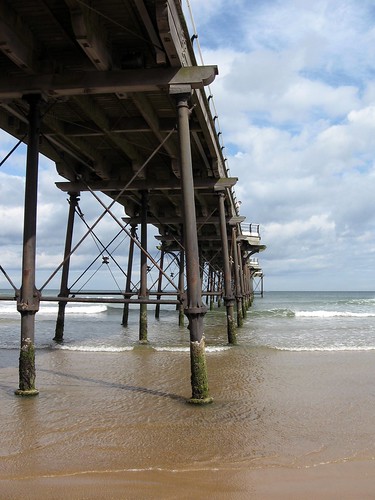
Surfers under the Pier
Surf and cliff view

See more Saltburn pictures
Alastair Montgomery’s Photography
Main Page,
My Shop at Zazzle Sign My Guestbook
Pinky the pipe clean "posh" rat
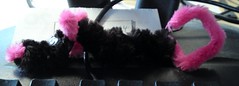
Pinky the pipe clean "posh" rat
Originally uploaded by Alastair Montgomery
Made for me by my niece Amy. Now has price of place on my desk at work.