Bare bones Arch Linux Install
Note: 1 of this post’s 5 links are now broken — mostly dead 2008–2013 feed-syndication infrastructure (FeedBurner, Gawker, AOL’s old blog network, Pheedo, Yahoo Pipes). Left as originally published.
- Download image from https://www.archlinux.org/
- Partition hard drives /dev/sda1 /dev/sda2 with GParted as ext 4
- Boot from ISO and check, setup network https://wiki.archlinux.org/index.php/Beginners%27_Guide#Wired
- Mount partitions mount /dev/sda1 /mnt ; mkdir /mnt/home; mount /dev/sda2 /mnt/home
- mkswap /dev/sda3 ; swapon /dev/sda3
- Edit Mirror List vi /etc/pacman.d/mirrorlist
- Install base pacstrap -i /mnt base
- genfstab -U -p /mnt >> /mnt/etc/fstab
- arch-chroot /mnt
- nano /etc/locale.gen
- echo LANG=en_GB.UTF-8 > /etc/locale.conf
- export LANG=en_GB.UTF-8
- ln -s /usr/share/zoneinfo/Europe/London /etc/localtime
- hwclock --systohc --utc
- systemctl enable dhcpcd@eth0.service
- passwd
- useradd -m -g users -G wheel,storage,power -s /bin/bash alastair
- passwd alastair
- pacman -S sudo
- visudo to uncomment wheel group sudo access
- pacman -S grub-bios
- grub-install --target=i386-pc --recheck /dev/sda
- grub-mkconfig -o /boot/grub/grub.cfg
- exit, unmount, reboot
- sudo pacman -S alsa-utils
- alsamixer ; speaker-test -c 2
- pacman -S xf86-video-vesa
- pacman -S xorg-server xorg-xinit xorg-server-utils xorg-twm xorg-xclock xterm
- sudo pacman -S ttf-dejavu
- pacman -S xfce4 xfce4-goodies
- systemctl disable fam.service
- pacman -Rd fam
- pacman -S gamin
- cp /etc/skel/.xinitrc ~/.xinitrc ; vi .xinitrc
- pacman -S openssh
- startx
Tiny Tiny RSS Part 2
Note: 1 of this post’s 7 links are now broken — mostly dead 2008–2013 feed-syndication infrastructure (FeedBurner, Gawker, AOL’s old blog network, Pheedo, Yahoo Pipes). Left as originally published.

Doodle's Geek Monkey by Alastair Montgomery
Tiny Tiny RSS
Note: 1 of this post’s 4 links are now broken — mostly dead 2008–2013 feed-syndication infrastructure (FeedBurner, Gawker, AOL’s old blog network, Pheedo, Yahoo Pipes). Left as originally published.
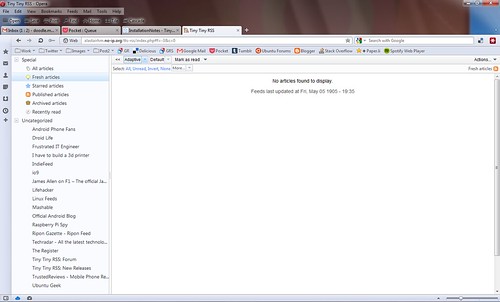
Setup on Lighttpd and MySQL using the instructions on http://tt-rss.org/redmine/projects/tt-rss/wiki as a replacement to Google Reader.
Working well so far.


Raspberry Pi Piwigo Instance Live
Note: 1 of this post’s 7 links are now broken — mostly dead 2008–2013 feed-syndication infrastructure (FeedBurner, Gawker, AOL’s old blog network, Pheedo, Yahoo Pipes). Left as originally published.


It is running on Lighttpd and mySQL.
Doodle's Geek Monkey by Alastair Montgomery
Raspberry Pi Media Center
Note: 1 of this post’s 4 links are now broken — mostly dead 2008–2013 feed-syndication infrastructure (FeedBurner, Gawker, AOL’s old blog network, Pheedo, Yahoo Pipes). Left as originally published.
Doodle's Geek Monkey by Alastair Montgomery
Setting up Piwigo on Raspberry Pi
After installing lighttpd and MySQL5 and the other prerequisites you can install it using
sudo apt-get install piwigo
Although this is an older version, if you want the latest you'll need to go through the manual installation route which is detailed on their web page.
On my Ubuntu desktop, I did a trial run updating the version installed with apt-get using the Piwigo's internal upgrade option but this failed so might not be a viable option. More upgrade information here.


Doodle's Geek Monkey by Alastair Montgomery
Lighttpd running on my Raspberry Pi
sudo apt-get install lighttpd
Although I had to create the www-data group manually before this would install successfully.
More details can be found on

Doodle's Geek Monkey by Alastair Montgomery
Ruby Script to send Twitter mentions over serial port
# Find your Twitter Mentions and send them to Arduino on Serial Portrequire “rubygems” require “twitter” #https://github.com/sferik/twitter for config details require “serialport” #http://rubygems.org/gems/serialport require “pp”
prevID = 0 puts “Setting Up Serial Port” myport = SerialPort.new("/dev/ttyACM0",“9600”.to_i) sleep(10) while true puts “Checking for mentions” latestMention = Twitter.mentions(:count => 1)[0] if prevID != latestMention.id msg = latestMention.user.screen_name + " " + latestMention.text puts “-” + msg bytes = myport.write(msg) puts “-” + bytes.to_s prevID = latestMention.id else puts “-No new updates” end sleep 60 end myport.close
Doodle’s Geek Monkey by Alastair Montgomery
Arduino LCD Message Scroller working
Here is the code (also at GitHub https://github.com/alastairhm/arduino.git)
// Auto scroll a message on the LCD and receive new messages via Serial port. // Alastair Montgomery (c) 2013 // Version 1.02 // include the library code: #include <LiquidCrystal.h> #include <string.h>// initialize the library with the numbers of the interface pins // below for SainSmart LCD Shield LiquidCrystal lcd(8, 9, 4, 5, 6, 7);